
If you have a Windows 11 PC, prepare to see the interface evolve. Microsoft is further modifying the desktop appearance with changes inspired by macOS. A new way to display icons is coming soon, and this is just the beginning.
Windows 11 is evolving rapidly, and the visible changes are coming one after another. The blue screen of death will soon display a black background, without a QR code or sad emoticon. Meanwhile, the integrated search is becoming more intuitive thanks to artificial intelligence, capable of understanding your words without having to type the exact formula. Little by little, everything you see on your screen is transforming.
Now, it's the taskbar that's changing. Microsoft is testing a new way of displaying icons at the bottom of the screen. Their size automatically adapts to the available space. The more software you open, the smaller the icons become. A feature that Mac users are familiar with with the dock, which automatically adjusts the size of items based on the number of open or minimized applications. 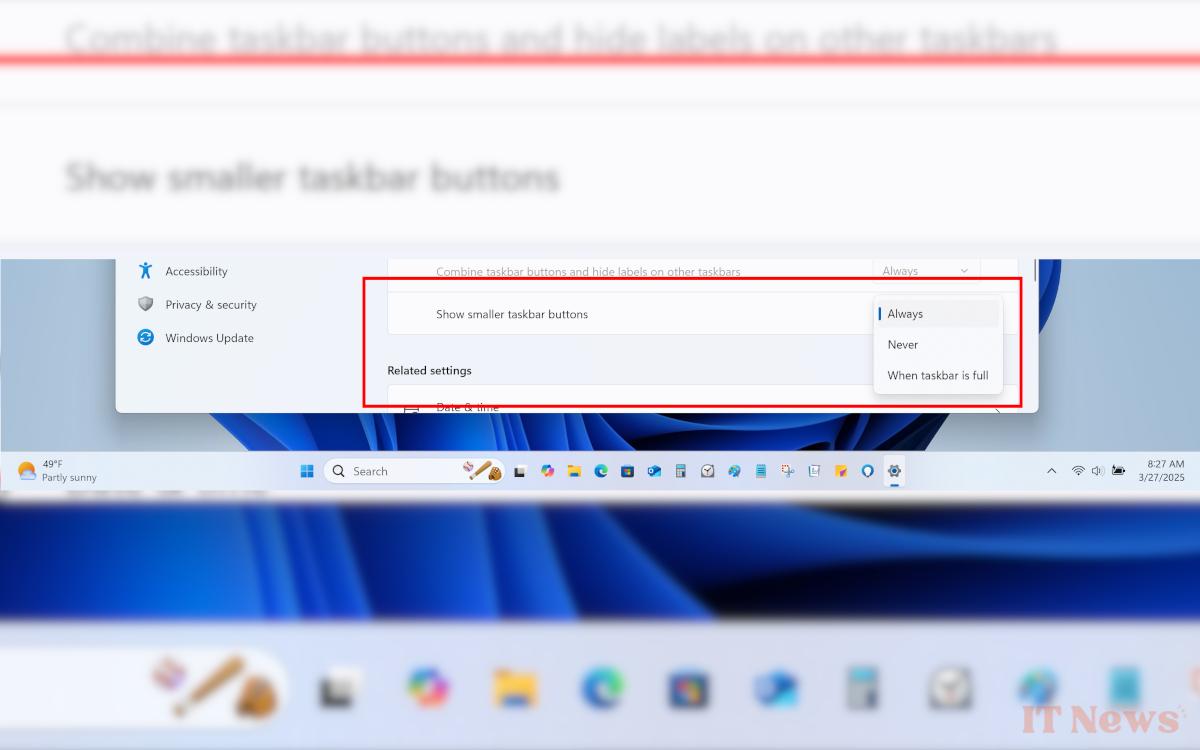
Windows 11 adapts the size of icons and offers a more flexible Start menu
These new options are accessible in the settings, in the section dedicated to the taskbar. Three settings are possible: keep the icons large at all times, display them small all the time, or only reduce them when the bar is full. This last option saves space without having to click on an additional menu to find your open applications. If you often use several programs at the same time, this change makes the organization clearer.
That's not all. Microsoft is also taking the opportunity to modify the Start menu. The interface becomes larger, and it is now possible to hide recently used applications. Instead, the system can directly display the complete list of your programs.
These new features are not yet available to everyone. They are being tested in preliminary versions of Windows 11, accessible via the Windows Insider program. Anyone can participate. Simply register via the system settings to receive future updates before their official release. This way, you can discover these changes before everyone else, directly on your PC.


0 Comments