
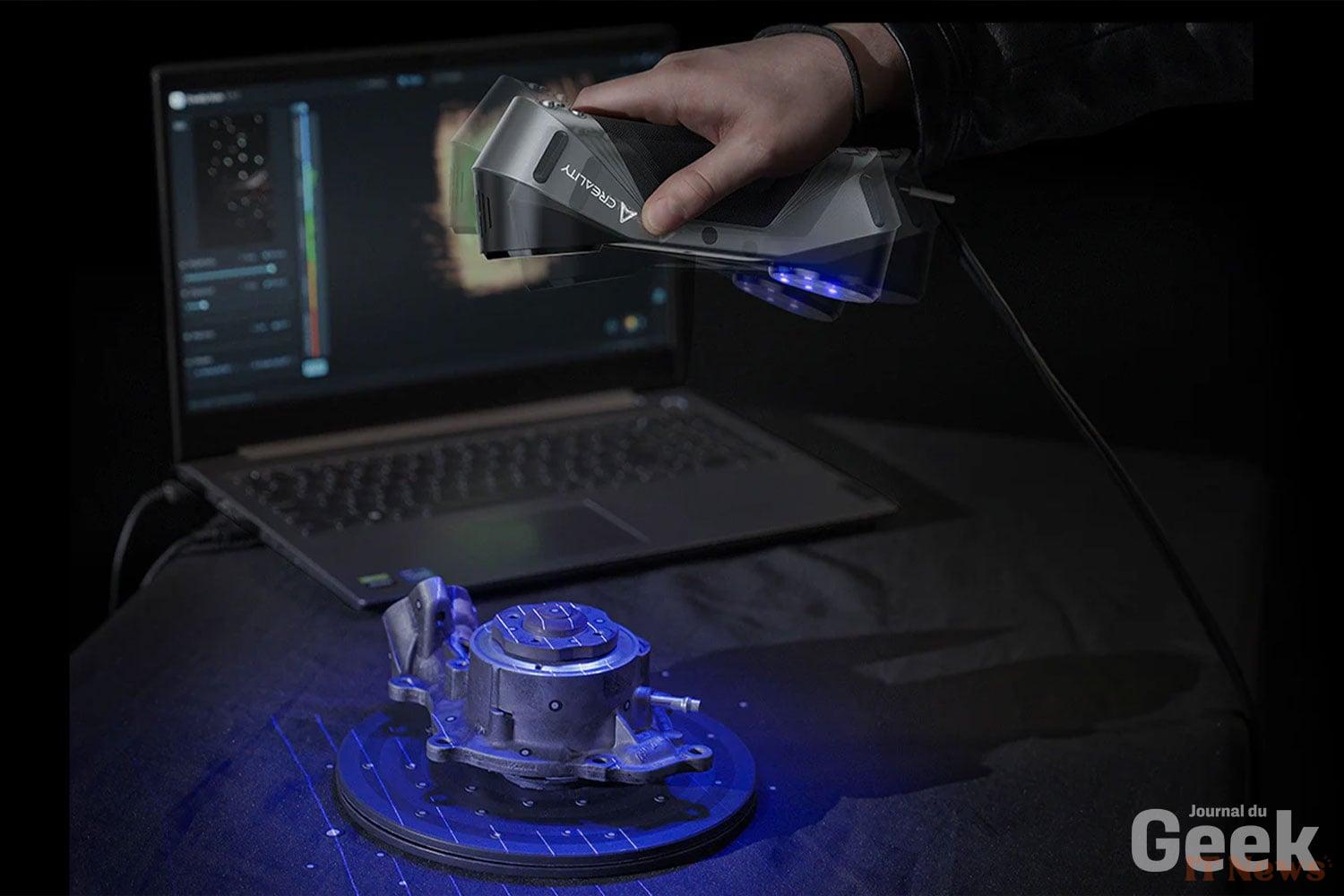
Launched in 2024 during Creality's 10th anniversary, the CR-Scan Raptor is the first consumer scanner with multiple blue laser lines. Priced at around €1,500, it aims to offer professional-level performance at a price well below traditional industrial scanners. The Raptor promises accuracy down to 0.02 mm in blue laser mode, without the need for mattifying spray on black or metallic surfaces thanks to advanced algorithms. Capable of scanning in 24-bit color, with integrated LED lighting, it is aimed at both makers and engineers looking for a versatile 3D scanning tool. One year after its release, how does this scanner fare after multiple updates and in the face of growing competition?
Technical specifications
On paper, the CR-Scan Raptor is impressive. Lightweight (372 g) and easy to handle with one hand, it has a non-slip shell and a wrist strap for secure use. It can scan objects from 5 mm (small figurine, screws) up to approximately 2 m (body parts) in two modes: blue laser mode and infrared (IR) mode.
In blue laser mode, seven parallel laser lines scan the object with a beam thickness of just 0.1 mm, making it possible to capture sharp edges and fine details. This mode thus offers the maximum accuracy advertised at 0.02 mm. The downside is that it may require repositioning targets (markers) on very uniform objects or when the highest accuracy is required, in order to ensure perfect alignment.
The second mode uses structured infrared light (dual-camera NIR technology): it allows marker-free scanning thanks to the speckle matching technique (projection of a random pattern) which aligns the shots with the surface characteristics. This IR mode is ideal for organically shaped or large subjects – faces, human bodies, cultural artifacts – without having to stick markers. Its accuracy is lower (around 0.1 mm) but remains sufficient for most creative or visual uses.

The scan volume and working distance are adjusted according to the mode. In blue mode, the field of view is approximately 270x170mm at 28cm distance, with an optimal working range between 15 and 40cm. In IR mode, the field of view expands (930x580mm at 1m distance) with a range of 17cm up to approximately 1 meter. This allows for rapid capture of large parts, even if it means assembling several scans if the object exceeds one meter.
In terms of speed, the Raptor is very fast: up to 60 fps in blue laser mode and 20 fps in infrared, high figures that translate into the possibility of acquiring a detailed 3D model in just a few minutes. Creality announces that an entire human body can be scanned in 2 minutes thanks to a specially designed morphological capture algorithm. The device generates dense point clouds, then converted into mesh (OBJ, STL, PLY formats supported). To preserve the quality of the scan, a high-precision glass calibration plate is provided, guaranteeing the calibration of the Raptor over time. There are also 12 white LEDs arranged in a ring around the sensors, which provide illumination for the color textures. Note that the scanner works via a standard USB-C (USB 3.0) wired connection to a PC or Mac – a detail that is important for the evolution of the device, as we will see.
Software and Ecosystem
Since the launch of the Raptor, Creality has significantly evolved its ecosystem. The Creality Scan software (included for Windows and macOS) has benefited from monthly updates bringing both fixes and new features.
Among the notable additions is the “Continue Scanning” function, which allows you to resume a project where you left off or to complete a mesh later, thus filling an initial gap. The editing interface has been enhanced with Mesh Smooth and Hole Fill tools, now available with a mid-calculation cancel option for added convenience.
Performance has also been optimized: a frame rate drop issue during extended scans in laser mode has been resolved, and detecting the correct scan distance has become more reliable thanks to better visual indicators. Creality Scan has also expanded its audience by integrating multiple languages (German, Spanish, Portuguese, etc.).

As for the hardware, Creality has introduced accessories and variations to expand its ecosystem. The most notable is the Scan Bridge, an add-on module that makes the Raptor wireless. Plugged into the scanner's USB port, this unit integrates a Wi-Fi 6 chip and a battery, and acts as a relay between the Raptor and a PC or smartphone. The goal is to eliminate the hassle of a USB cable during scans, which could cause stability or compatibility issues on some computers. The Scan Bridge creates its own 5 GHz Wi-Fi network and ensures fast transmission of scan data, with a dongle provided for PCs without Wi-Fi6.
In addition, Creality has implemented a screen mirroring function in the software to allow a smartphone to serve as real-time visual feedback while scanning wirelessly on a PC. In practice, you can hold the Raptor in one hand and your phone in the other, view the rendering live, while the PC processes the data – a more comfortable configuration, especially for scanning large objects.
The software has also adapted to this mode of operation: version 3.3.42 of Creality Scan, for example, introduced fixed network addressing to avoid having to re-scan the connection QR code for each new project in wireless mode. While 100% mobile scanning (without a PC) is not yet fully developed – the Android application in particular remains limited in high-performance laser mode – Creality is laying the foundations for an environment where mobile scanning will become possible in the short term, as the power of mobile devices increases.

Creality Scan, although proprietary, exports in standard formats (OBJ, STL, PLY), which allows 3D models to be retrieved in most 3D suites on the market (CAD/CAM software, Blender, Maya, etc.) without any problems. Color textures are saved as JPEG or PNG images accompanying the 3D file (e.g. an OBJ + a .MTL file + a UV image). We appreciate that Creality has not restricted its scanner to a closed ecosystem: it is therefore quite possible to scan an object, export the mesh and rework it in MeshLab, ZBrush or a 3D printing slicer like Ultimaker Cura. Conversely, there is currently no third-party plugin to control the Raptor from another software - you have to go through Creality Scan for acquisition.
Daily user experience
Despite its detailed technical specifications, the CR-Scan Raptor remains designed to be easy to use. The initial installation is as simple as plugging in the scanner (two cables to connect: USB and power) and launching the supplied Creality Scan software. During our test, we downloaded the latest version of the software from the Creality website and connected the Raptor in a few minutes. However, a Windows 11 update prevented us from using it immediately, so we had to do some not-so-obvious manipulations (uninstalling Windows updates, updating the firmware, etc.) to finally be able to use it!
The calibration with the glass board was done in a guided way: the software displays instructions for positioning the scanner in front of the plate at different distances. In three minutes, the calibration was done and we did not have to return to it afterwards – the scanner remained stable, without any noticeable drift in accuracy during several days of use. The CrealityScan software interface (v3.3.42 at the time of testing) is simple and clean.
A button to start/stop the scan, a few options to choose the mode (Blue or NIR), with or without color, and to switch between individual scans or stitching several scans. Beginners will appreciate the built-in step-by-step tutorials and the relatively simple menus. Experts, however, might find the software a bit light on advanced features. For example, it doesn't (yet) offer any real tools for retouching point clouds while scanning—you can delete a few isolated points and roughly crop them, but not much more. Similarly, the automatic alignment of multiple scans (to scan an object from all angles) works well as long as there are enough reference points, but it sometimes lacks flexibility on very symmetrical shapes. That said, Creality improves its software regularly: monthly updates have been reported, fixing bugs and adding options.
During our test, an update was also released, improving compatibility with certain GPUs and correcting issues encountered during installation.

In terms of hardware ergonomics, scanning with the Raptor is a real pleasure. Its lightness reduces fatigue during extended sessions, and the shape of the handle allows for precise handling. A well-placed button on the top of the device is used to start or pause capture without having to return to the computer, which is very practical in portable mode. The USB 3.0 cable is long and flexible enough not to hinder our movements, although we must be careful not to get tangled up around large objects (this point highlights the potential interest of the wireless module, especially for scanning a person or even a vehicle, for example). The circular LED indicator proved useful: it turns green when the scanning distance is optimal and flashes if we move too far away or if tracking is lost. Thanks to the anti-shake technology, we almost never lost track of the object once the scan was engaged, even when moving quite quickly around the room. Note that the system copes well with small vibrations or hand tremors.
Scan Quality
In the end, what about the results? On this point, the CR-Scan Raptor largely lives up to its promises. To assess the quality, we scanned a variety of objects: a small, detailed 5cm figurine, a cup-sized aluminum mechanical part, and a human torso. In each case, the scanner captured the geometry with finesse. The figurine's small engravings and sharp edges were clearly visible in the 3D model, with no visible distortion. The mechanical part, which has deep holes and recesses, was scanned in its entirety, with the Raptor managing to capture areas that were otherwise difficult to access by orienting the device at different angles. A fine blue laser helps reach these details in cavities where a conventional LED scanner might have struggled.
When scanning people, the Raptor also performs very well. By activating the "Face & Body" mode, optimized by a specific algorithm, we were able to scan a colleague's torso in less than two minutes, without a marker, and obtain a realistic textured 3D model. The facial features are well defined and the hair, while always tricky to scan, appears as a decent diffuse volume. The fact that the infrared illumination is invisible to the human eye makes the experience more comfortable for the person being scanned (no glaring flash of light). Be careful though, as with all scanners, a person must remain relatively still during capture – a few seconds of extraneous movement can create artifacts or blurs in the model. Since the Raptor is fast, this is generally not a concern for a head or body scan in a few minutes. Examining the generated files, we see overall very clean mesh quality. The point clouds are well aligned and dense, and the CrealityScan software automatically generates a fairly homogeneous mesh (merged mesh). The triangles are well distributed and the algorithm automatically fills in small holes when possible.
On complex objects, there are sometimes small gaps or noise (a few isolated outliers), but a quick cleanup in third-party software (e.g. MeshLab or Blender) is enough to obtain a perfect model for 3D printing or archiving.
As for color capture, the Raptor delivers rather convincing 24-bit textures. The 12 white LEDs provide uniform lighting, and a color mapping algorithm refines the color matching on the final model. The resulting color scans are sufficient for visualization. It should be noted that on very dark surfaces, the color rendering was initially biased (purple tendency on black) but this bug was recently corrected via a firmware update. Obviously, texture capture doesn't match that of a DSLR camera: the resolution of color images is limited by the sensor (approx. 2.3 MP per camera), so texture detail can appear a little blurry up close. Nevertheless, to dress up a 3D mesh in a few clicks, this remains a significant advantage compared to purely "geometric" scanners that output uniformly gray models.
The fineness of the generated mesh has also been improved by Creality over the versions – the latest algorithms reduce the appearance of artifacts on the edges of objects, and the smoothing function helps to erase any residual roughness. In short, the Raptor produces very good quality scans for its price range, suitable for use as is for 3D printing, or as a basis for more advanced modeling.
Strengths and limitations
The Creality CR-Scan Raptor has, in the space of a year, established itself as a benchmark for advanced consumer 3D scanners. Its strengths lie in its excellent accuracy for the price, its dual laser + infrared technology which gives it great versatility, and the attention paid by Creality to improving it through regular updates. The fact that it can capture a small part as well as a human subject, in color and without complicated preparation, is a strong argument in favor of the Raptor. It has democratized features (multi-blue laser, markerless scanning of difficult surfaces) that were previously only seen on much more expensive devices. Moreover, the addition of wireless via Scan Bridge addresses one of the main initial criticisms.
However, the Raptor is not without its limitations. The first is inherent to its category: it requires a certain personal investment to master. It is not a “plug and play” gadget for total novices – you need to understand the principles of 3D capture, know how to calibrate, adjust scan settings according to conditions, etc. Its software, although improved, can still seem intimidating for a complete 3D beginner.
Next, despite the wireless feature, the Raptor remains dependent on a powerful PC to deliver its full potential. The promise of scans directly processed on mobile is still to come, which means that you must be willing to mobilize a powerful workstation for the most complex projects. You do indeed need a computer powerful enough to process the data: Creality recommends at least 16 GB of RAM and a decent graphics card. We confirmed that with 16 GB of RAM, the software ran smoothly, using around 12 GB at peak on our large scans. With only 8 GB, we could be limited on complex scans. Similarly, a mid-range GPU (GTX 1660 or higher) is recommended to streamline real-time display and reconstruction. On our test machine (AMD Ryzen 5, 32 GB RAM, RTX 4070), everything was smooth, but a more modest configuration might struggle to keep up with the Raptor's 60 fps pace.

Furthermore, while the Raptor is effective without mattifying powder on most materials, it still cannot properly scan transparent surfaces (glass, water) or perfect mirror surfaces – extreme cases that require tricks (spray, projection scanning).
Finally, the appearance of the Raptor Pro and RaptorX models could overshadow the original version a little: those looking for the best of Creality in 2025 might opt for the (faster) Raptor Pro or the RaptorX (built-in wireless, additional lasers), relegating the standard Raptor to a mid-range model. Nevertheless, the latter maintains a very attractive performance/price ratio and benefits from most of the advances via its updates.
The Creality CR-Scan Raptor is available for 899 euros with the code NNNFRCR3DS for a limited time at Geekbuying!


0 Comments