
Despite the thunderous launch of inZOi, The Sims 4 can sleep soundly. Its first real competitor is still far from being ready, needing serious updates before offering a worthy early access. The most curious quickly returned to their favorite game, whose possibilities are at this stage almost infinite thanks to mods. Exactly! If you are part of the vast majority who plays with personalized content, an important warning is in order.
Malware in some Sims 4 mods
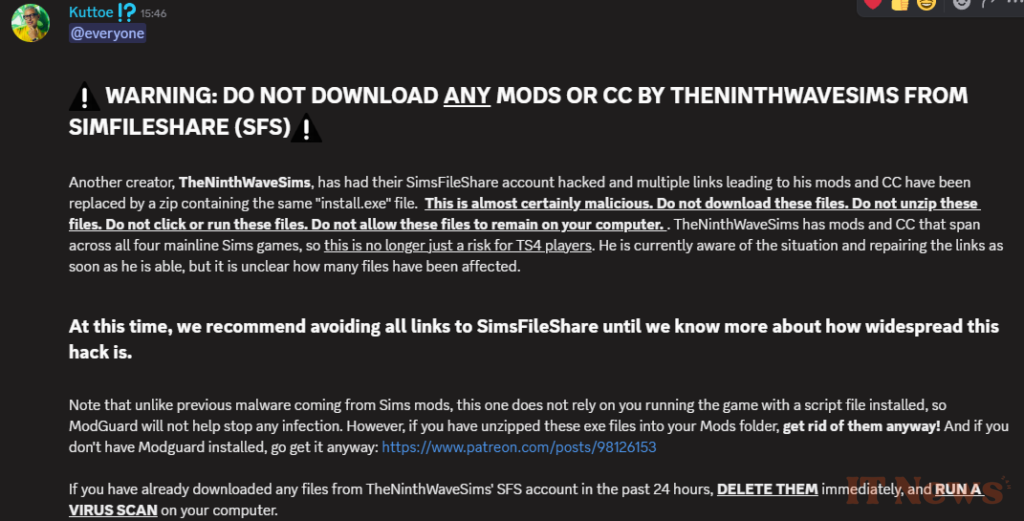
Mod compatibility issues are a recurring problem. Each new DLC systematically causes problems that force creators to update their content. That's routine. The problem that has been troubling Sims 4 players for a few days now is something else entirely. Several well-known modders within the community have been targeted by malicious hackers. More specifically, the links to their creations, both recent and old, on SimFileShare have been replaced without their knowledge to add viruses and other malware.
If you have recently downloaded Sims 4 mods from "Simandy" or "TheNinthWaveSims", be very careful. Check that the folder does not contain only one "install.exe" file. If this is the case, do not click on it, as this could install a virus on your computer. Quickly delete these files and scan them with your antivirus software just to be safe. Unlike malware that could previously be hidden in certain mods, this one does not require launching The Sims 4 for its script to run and therefore cannot be detected by ModGuard. So far, only these two creators have confirmed they have been affected, but it is not excluded that others have been victims of the same hackers.
How to avoid installing viruses with cc?
This is unfortunately not the first nor the last time that modders have been targeted by hackers. As always, be careful before installing mods on The Sims 4. Remember that mod files will always have the .package or .ts4script extension. If you see a file that requires installation or an .exe, delete it immediately. It is also not recommended to extract RAR or ZIP files directly into your mods folder.
We always recommend using the official channels of the content creators and avoiding any sidelinks, especially if they use a URL shortener. Performing a regular scan with your antivirus and installing ModGuard to protect yourself from malicious Sims 4 ccs therefore remains essential and we can only advise you to do a check at least every week if you regularly download mods.
Source: Simandy


0 Comments