
First limited to a few smartphones, eSIMs have become more widespread. It's even possible to switch from a physical SIM card to an eSIM in just a few minutes, directly from your smartphone. We'll explain how it works.
In the near future, our smartphones will no longer have a slot for a SIM card. They will eventually be replaced by their digital equivalent, eSIMs. Initially quite marginal, they are now widely available, although there are still a few exceptions. Now, almost all operators offer the option of converting your physical SIM card to an eSIM.
The advantages are numerous. Since you can register multiple eSIMs on a single device, it becomes very easy to switch from one network to another. This is useful if you regularly travel to a foreign country, for example. No need to get another SIM card and carry it with you at the risk of losing it.
The eSIM also makes things like activating a line or changing your number easier. Finally, if you're environmentally conscious, you'll appreciate getting rid of a piece of plastic.
What you need to know before converting your SIM card to an eSIM on Android and iOS
First of all, remember that this process isn't necessarily possible with all mobile operators. With Free, for example, you can't yet convert a SIM card to an eSIM on an iPhone. The feature is expected to arrive with iOS 18.5, the first beta of which was released in early April 2025.
In all cases, whether on Android or iOS, you must first connect your smartphone to a Wi-Fi network. The cellular connection will indeed be cut during the operation and the mobile needs the Internet to finalize it. Last important point: once the eSIM is operational, the physical card will be deactivated.
Also read: Are you looking for a dual eSIM Android smartphone? Here is the list of all compatible models
Transform a SIM card into an eSIM on Android (excluding Samsung smartphones)
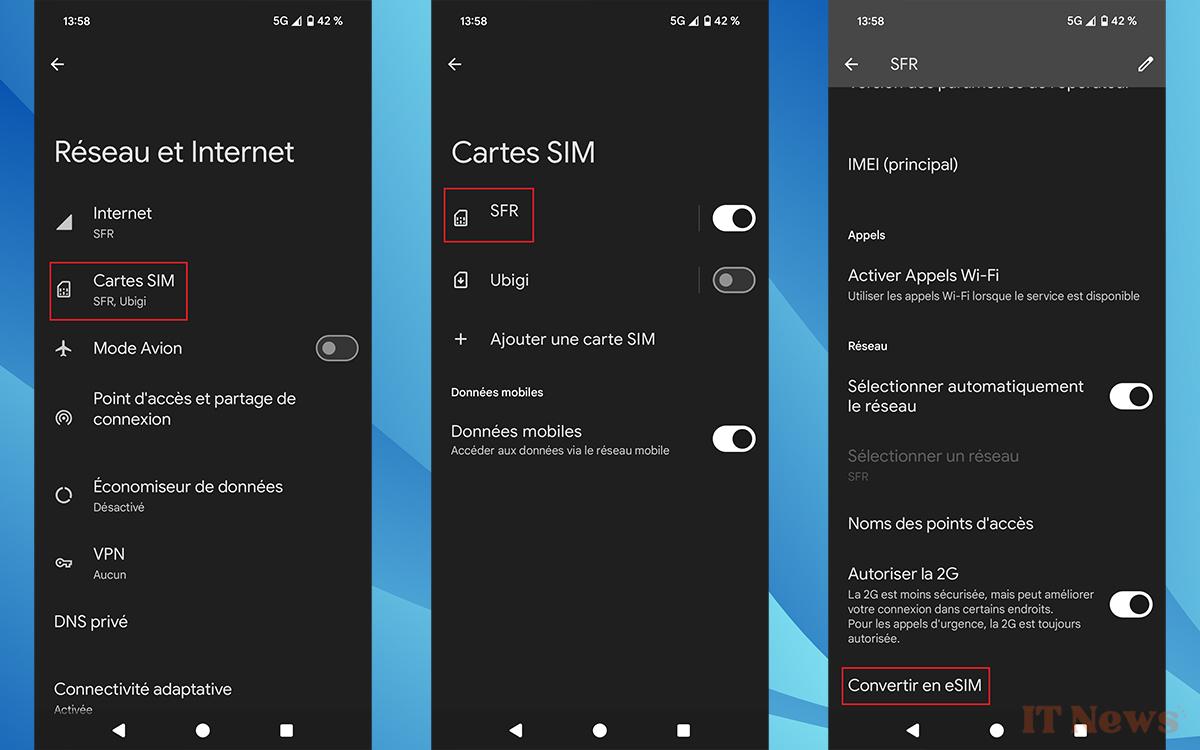
The operation is very simple. This was done on a Pixel 8 running Android 15. The names may change slightly if you are using an earlier version of Google's mobile operating system:
- Open the Settings app on your device.
- Open Network & Internet.
- Tap SIM Cards.
- Tap the one you want to convert. By default, it has your carrier's name and your mobile number just below it.
- Scroll to the bottom of the page that opens to find Convert to eSIM.
- A window will appear. Inside, tap Convert to eSIM again and wait a few minutes for it to complete.
- When the conversion is complete, remove the physical SIM card from the phone.
Converting a SIM card to an eSIM on a Samsung smartphone
Nothing complicated compared to another Android mobile, only the procedure to follow is slightly different:
- Open the Settings of the mobile.
- Go to the Connections section and choose SIM Manager.
- Tap the name of your physical SIM card. It defaults to your carrier's name.
- Tap the Convert to eSIM option.
- A window will appear, tap Convert to eSIM again.
- Once the operation is complete, remove the physical SIM card from the phone.
Convert a SIM card to an eSIM on an iPhone
With a smartphone from the brand with the bitten apple, follow these steps:
- Go to the iPhone's Settings then to the Cellular Data menu.
- Tap Convert to eSIM.
- Tap Convert the plan cellular phone.
- Select Convert to eSIM.
- Wait for the eSIM card to activate. The old physical SIM card is deactivated when the eSIM takes over.
- Remove the SIM card from the iPhone and restart it.
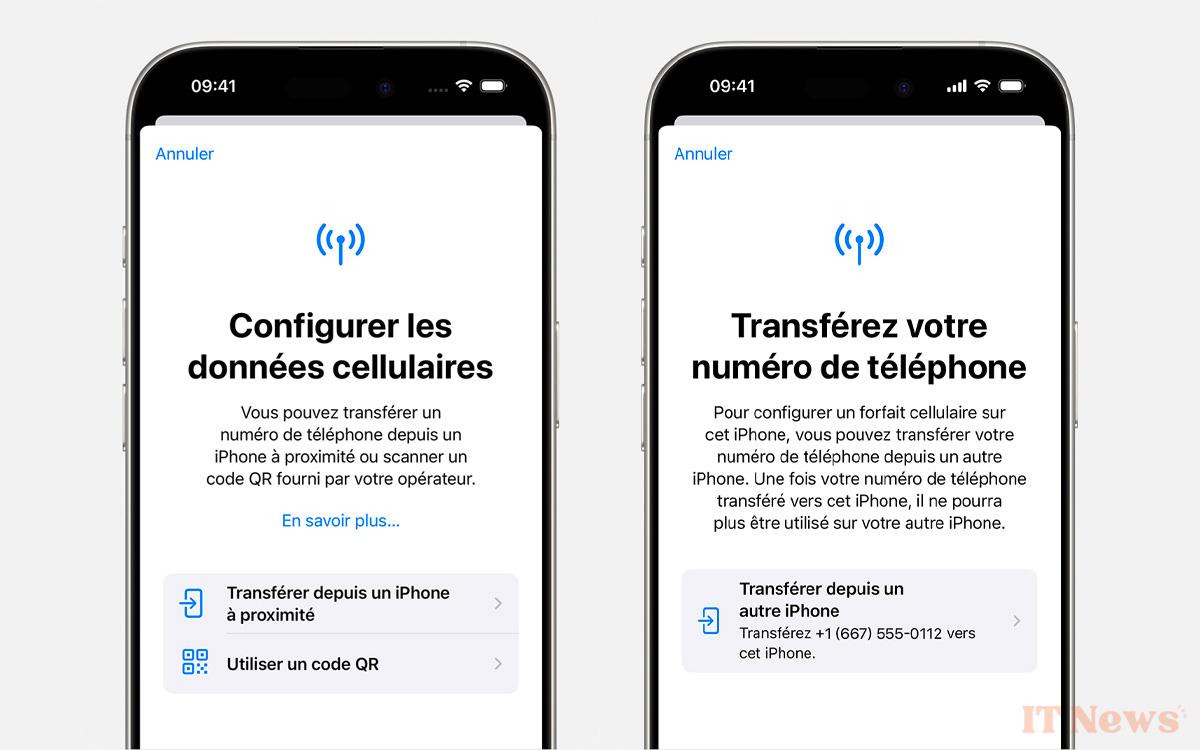
Note that if you don't see Convert to eSIM in step 2, it means your carrier doesn't support the conversion. The only solution is to contact them and request the transfer of your phone number to an eSIM.
This can be done either via the Activation of the eSIM by the operator function, or by using a QR code provided by the latter. They will explain what to do in either case.


0 Comments