

Like millions of French people, you may receive incessant sales calls on your iPhone every day. A real scourge that gets on everyone's nerves. Fortunately, there are several ways to get rid of these annoying phone calls for good.

More than one in three French people. This is the number of users who receive an unwanted call on their smartphone every day, according to a study published by UFC Que Choisir in 2023. Even today, this scourge is still relevant and gets on the nerves of millions of people.
Nevertheless, a bill tabled in Parliament at the end of September 2024 gives us hope. Examined and adopted in first reading by the National Assembly in March 2025, this bill aims to “strengthen consumer protection against the abuse of telephone canvassing”.
In concrete terms, and starting January 1, 2026, telephone canvassing will be formally prohibited, provided that the consumer has previously given their consent to be contacted. Furthermore, operators will have to participate in the war effort by offering an SMS spam filter to their subscribers. Finally, landline numbers will no longer be able to automatically appear in online directories. Unfortunately, we will have to wait for the second reading by the Senate and the final promulgation of the text to benefit from these advances.
Also read: How to permanently block cold calling on your Android smartphone?
Existing measures against cold calling
In the absence of this proposed law, several measures already exist to protect users against cold calling. Since March 1, 2023 in particular, this practice has been drastically regulated:
- telephone platforms are only allowed to call you from Monday to Friday, between 10 a.m. and 1 p.m. and from 2 p.m. to 8 p.m.
- no commercial communication is authorized on weekends and public holidays, except with the user's consent
- contacts are limited to 4 per person per month
- if you refuse to be contacted during a call, salespeople are not allowed to call you back within 60 calendar days

Numbers reserved for canvassers
Another important fact is that since January 1, 2023, ARCEP has allocated a wide range of numbers specific to canvassing platforms. For mainland France, companies must therefore only use numbers beginning with:
- 0162
- 0163
- 0270
- 0377
- 0424
- 0425
- 0568
- 0569
- 0948
- 0949
For the French overseas departments and territories, direct sellers must also use specific prefixes, namely:
- 09475 for Guadeloupe, Saint-Martin and Saint-Barthélemy
- 09476 for French Guiana
- 09477 for Martinique
- 09478 for Réunion
- 09479 for Mayotte
The case of numbers in 06 and 07
What about numbers starting with 06 or 07? Contrary to what one might think, professionals can still use their 06 or 07 line to contact you: “If your mobile phone number is used by a single natural person who uses a mobile phone on a mobile network, the numbering plan authorizes you to use your mobile number regardless of the purpose of your call or message,”writes ARCEP on its website.
Be careful, however, the Telecoms regulator clearly specifies that it is prohibited “to use a mobile number with automated calling and messaging systems” designed in particular to contact a very large number of people simultaneously.
How to block canvassing numbers for good on your iPhone
Unlike Google, which offers While Apple doesn't yet offer a dedicated tool for iPhones on its Pixels, to find an effective solution, you'll have to turn to third-party apps. Specifically, we recommend Begone.
Like Prefix blocker on Android, this app available for free on the App Store lets you “quickly and effortlessly block individual numbers or ranges of numbers.” Importantly, Begone has made privacy a priority. This is because the app runs entirely locally on your device and does not collect or transmit any data.
Since recent updates, Begone has become more efficient thanks to the ability to directly download lists of numbers to block proposed by the community.
How to configure Begone on your iPhone
Download and authorize Begone
The first step is quite logical: go to the App Store to download Begone on your iPhone. Once this is done, a detour is necessary in your smartphone's settings:
- Go to Settings > Apps > Phone
- Now tap Call blocking and identification
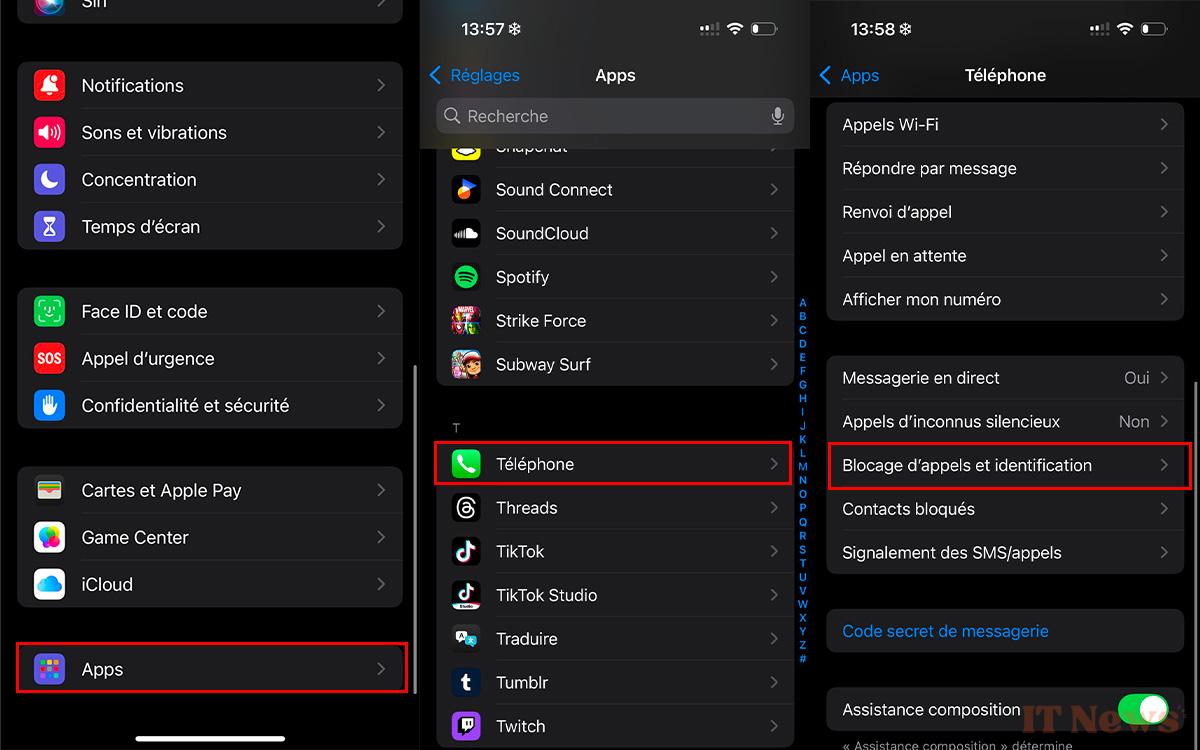
- Now activate the following two options: Begone – Automatic protection and Begone – rule lists
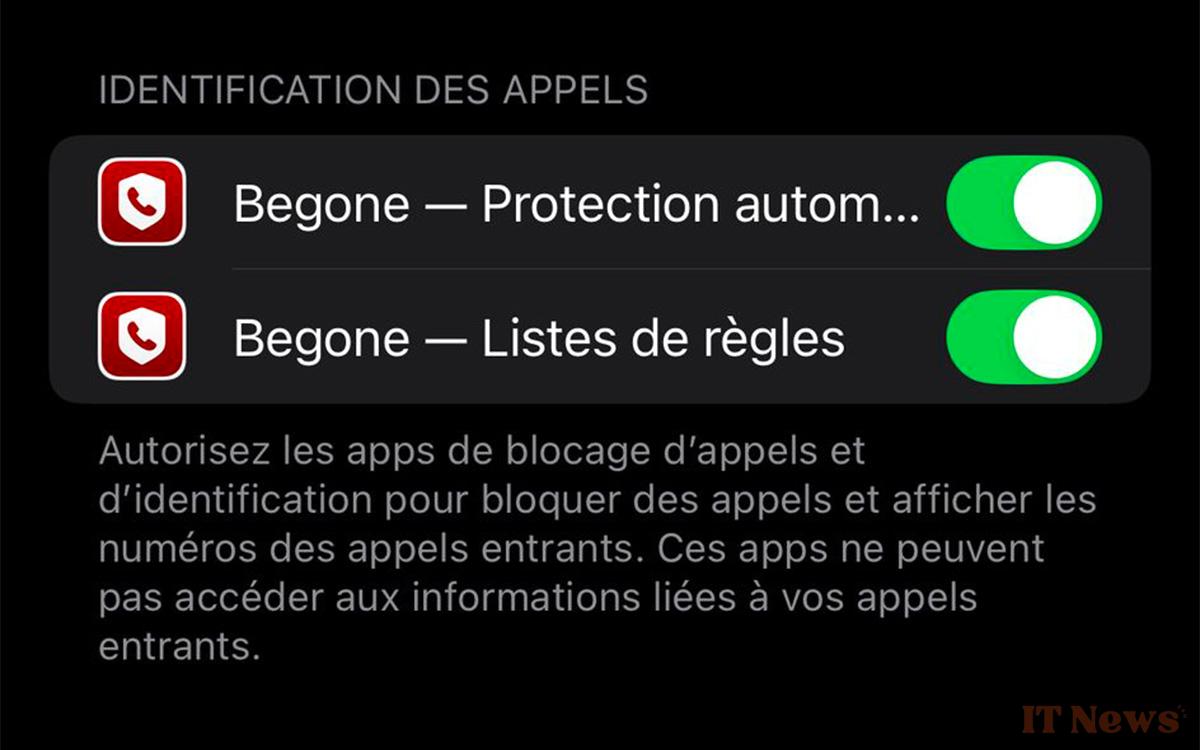
This way, your iPhone will use Begone to identify incoming calls and block them if necessary.
Using a block list
This is where it gets a little complicated, but follow our steps to the letter, everything should go well:
- Open the Begone app and on On the home page, look for the Browse community lists tab.
- Now scroll through the different lists until you come across the one proposed by Jérome Fresney and titled: Canvassing numbers for Metropolitan France
- Install the list and confirm the operation by pressing Yes in the pop-up window.
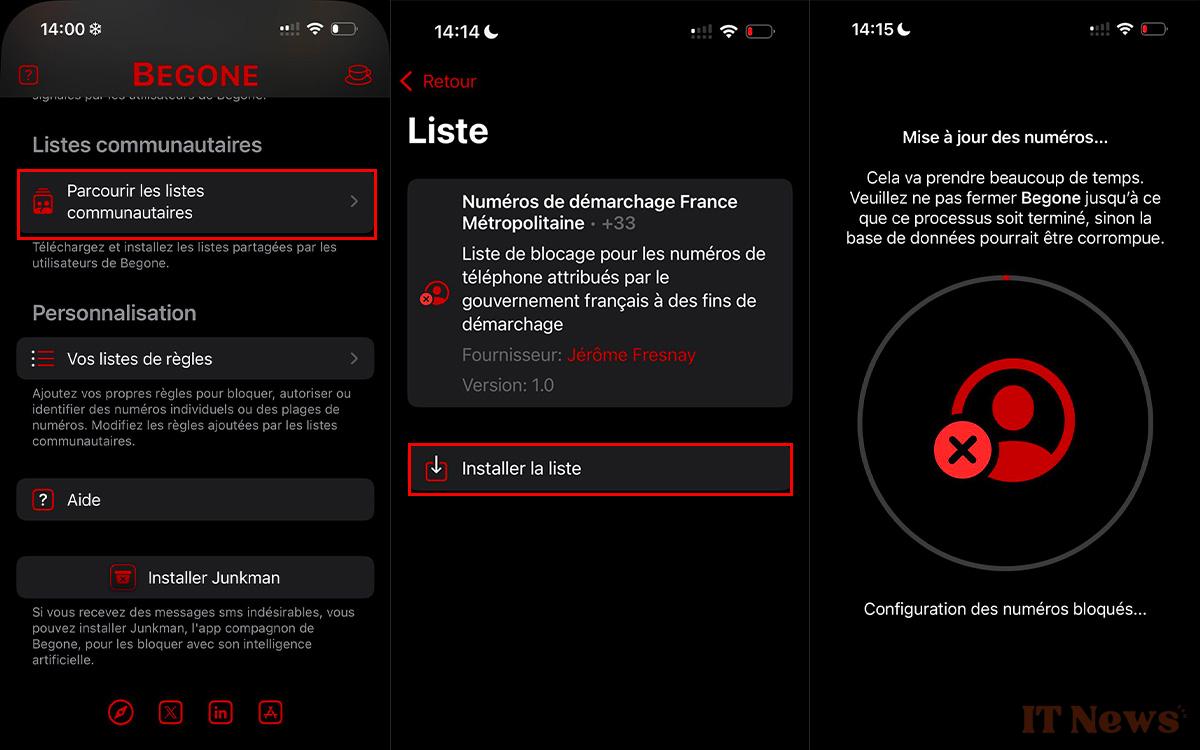
Once this is done, Begone will begin configuring the blocked numbers. As you can imagine, the procedure will take a little time. This is because the app is currently indexing no fewer than 30 million numbers associated with canvassing companies. Make yourself a coffee or tea while you wait, and above all, do not close Begone before the process is complete, otherwise you risk ending up with an incomplete or corrupted database.
Once the operation is complete, you should end up with a list of blocked numbers including all the prefixes assigned to the direct sellers:
- +33162
- +33163
- +33270
- +33271
- +33377
- +33378
- +33424
- +33425
- +33568
- +33569
- +33948
- +33949

Now, Begone will block all calls from these numbers on your iPhone for you. In your recent call history, all incoming calls rejected by Begone will be displayed with the following message: Begone: number blocked. And there you have it, you are now rid of all these unwanted calls!


0 Comments