
You can share your WiFi VPN connection with other devices so they benefit from the same protection. This can be a useful option in many situations.
To protect your devices with a VPN, you normally need to install the app on each of them: smartphone, tablet, computer, etc. That's why most VPNs allow you to use the same account on multiple devices simultaneously.
With NordVPN, for example, a single subscription allows you to secure up to 10 devices at the same time. This is enough to protect your various personal devices, provided they are compatible with the app.
Indeed, there are still devices on which you cannot directly install a VPN. This is the case for the most popular gaming consoles on the market: PS5 and PS4, Xbox (Series X/S and One), and even the Nintendo Switch. However, VPNs are quite popular with gamers.
This obstacle is not inevitable, since there are a few options to get around it. The most obvious is to configure a VPN directly on your internet box to protect all the devices that connect to it.
There is, however, a problem: most operator boxes do not allow you to configure a VPN directly. And even when it is possible, it is subject to numerous limitations, as on Freeboxes for example. There is still one option that works well: WiFi connection sharing from a PC.
How to share your VPN connection by creating a WiFi access point on Windows?
This is a relatively easy solution if you have an account with a VPN provider that allows this type of sharing. It's possible with NordVPN, but the procedure we're going to show you only works with Windows PCs. Sharing a VPN connection via WiFi doesn't work on Android, iOS, or Macs.
To begin, install the NordVPN app on your computer if you haven't already. Since this service is paid, you first need an active subscription.
Then:
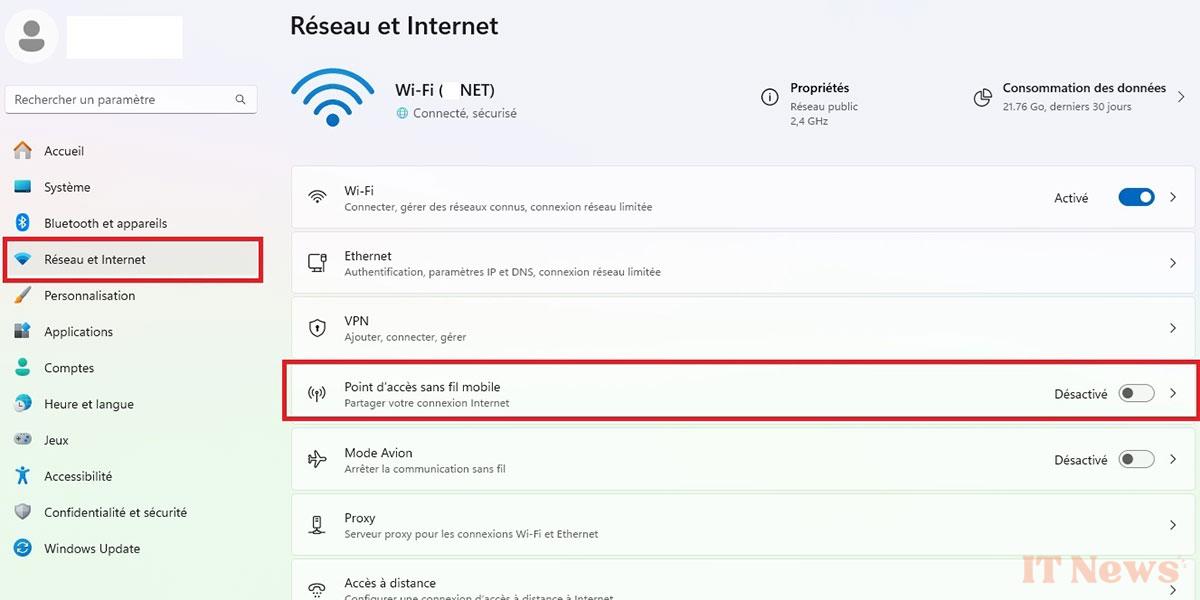
- Go to Windows Settings =» Network and Internet =» Portable Wi-Fi Hotspot
- Activate the Hotspot and make sure that the sharing mode is set to Wi-Fi, as in the screenshot below
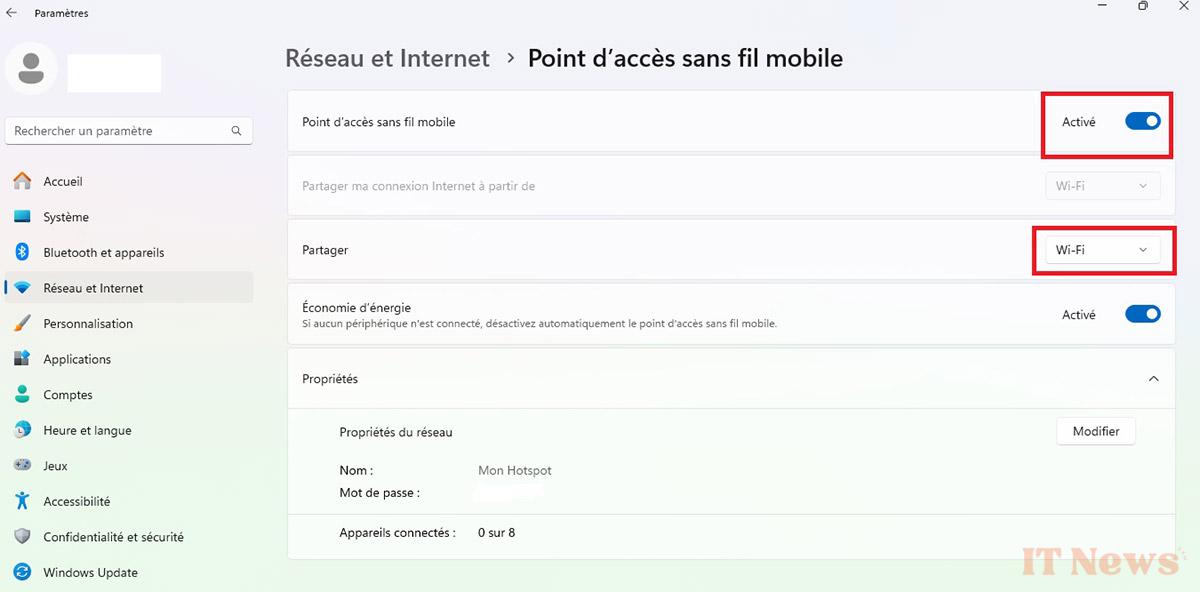
- A little further down, click on the Edit button in the section Network Properties to customize the access point name and set your own password
Once connection sharing is enabled:
- Right-click on the Start menu and click on Run. Alternatively, you can use the key combination Windows + R which also opens the Run panel
- In the dialog box that opens, type the command ncpa.cpl and confirm. Windows will directly open Network Connections on your computer
- Check that two networks are active. The second is the network shared from your PC. Make a note of this for the next step
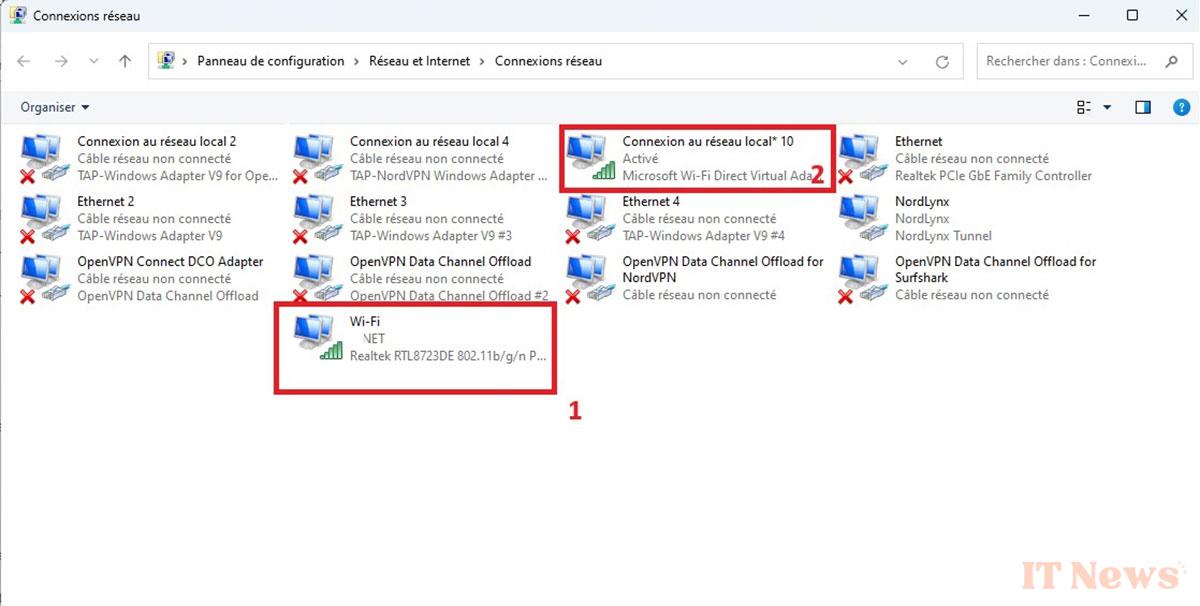
- Right-click on the OpenVPN Data Channel offload For NordVPN
- In the window that opens, go to the Sharing tab, then check the Allow other users on this network to connect via this computer's Internet connection option. Validate.

You are now ready to enjoy your VPN connection on any other device via the WiFi access point you just created. There is now one last step. This consists of configuring the OpenVPN protocol (TCP) in the NordVPN settings. Indeed, VPN connection sharing does not work with Nordlyx and other protocols. It is therefore very important to validate this step.
- Launch NordVPN
- At the bottom left, click on the gear icon to access Settings
- Then go to Connection
- Under VPN Protocols, select OpenVPN (TCP) instead of the Automatic
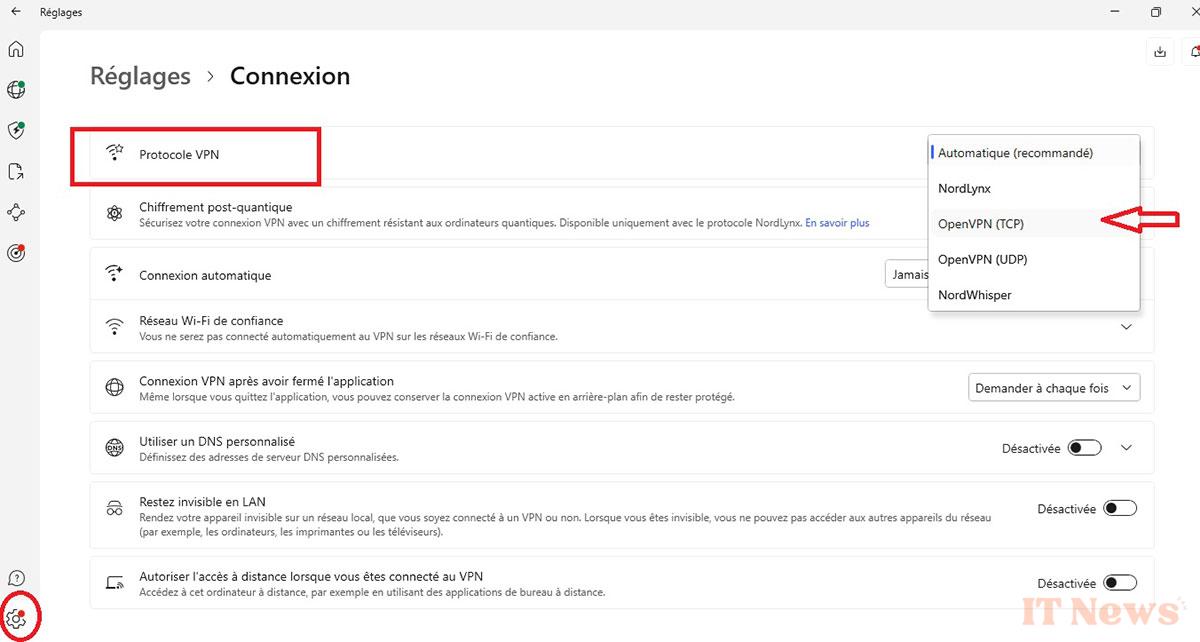
Everything is ready. All you have to do is return to the NordVPN home page and connect to a server of your choice. Your PC is now protected, as are all the devices that will connect via WiFi to the access point you just created in Windows.
Finally, don't forget to check that the IP address on your computer and on the other devices is that of the VPN server.
NordVPN VPN Full Features.


0 Comments